

L2TP/IPsec on Ubuntu is one of those things that should be easy. The UI is there, the docs say “fill these fields and connect”… and then you hit a timeout and start questioning your life choices.
This guide walks through a setup that actually works on Ubuntu (20.04 and newer), plus fixes for the most common ways it fails (timeouts, EAP errors, and authentication problems).
L2TP (Layer 2 Tunneling Protocol) is a VPN method that creates a tunnel between your device and a VPN server, and IPsec adds encryption to keep that tunnel secure.
Install the L2TP NetworkManager plugin
NetworkManager-l2tp is the most painless way on desktop Ubuntu. It’s a VPN plugin that supports L2TP and L2TP/IPsec through NetworkManager:
sudo add-apt-repository ppa:nm-l2tp/network-manager-l2tp
sudo apt update
sudo apt install network-manager-l2tp network-manager-l2tp-gnome
At the time of writing, it was 1.20.4, useful resource is github repo - https://github.com/nm-l2tp/NetworkManager-l2tp. I suggest you go through reported issues and Wiki for Known Issues.
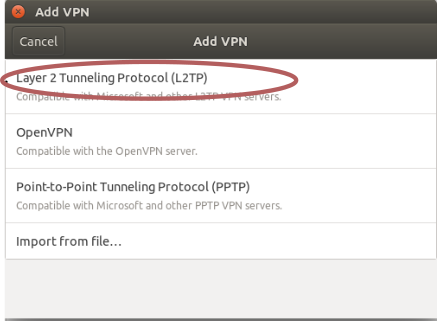
Go to Settings -> Network -> VPN -> Click a + sign -> L2TP:
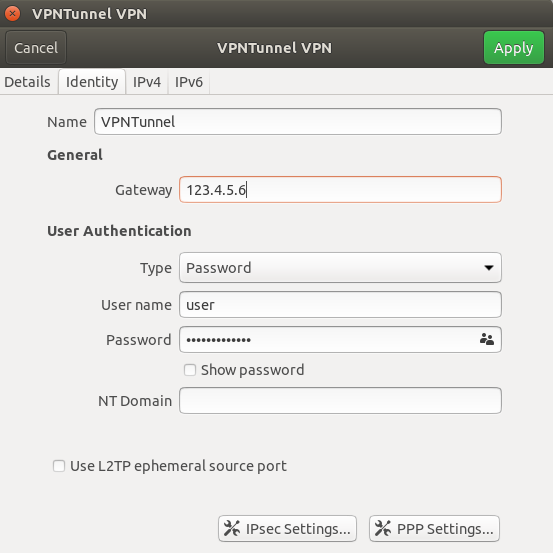
Type your gateway ip, username and password:
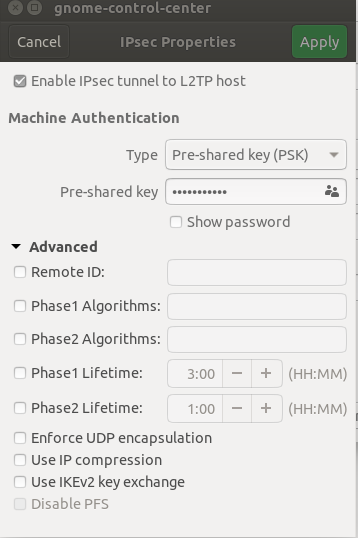
Click on IPsec Settings and type your pre-shared key, don't fill anything in Advanced, just click Apply, and Apply again.
As far as documentation I saw, that would be enough for connecting to the VPN. But nope, my VPN was constantly timeouting.
Create the VPN connection (GUI)
Figuring out what went wrong, that was a pain.
I scanned the logs in syslog and journalctl -f , found an error like "EAP: unknown authentication type".
If you get a similar error, solution would be to go to your VPN settings, then PPP settings, disable all authentication methods except one, like MSCHAP.
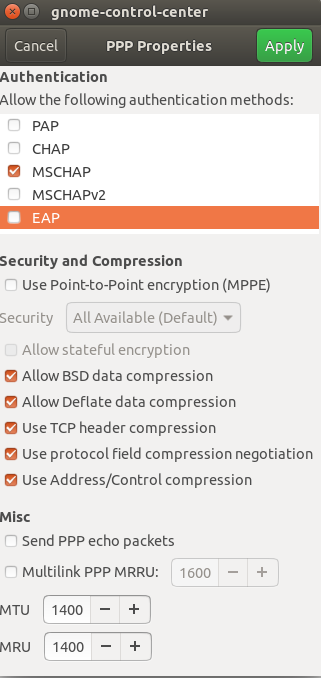
Click Apply, try connecting to the VPN, and hopefully you'll finally connect like I did.
Watch on Youtube.


